Nano Banana ControlNet - Advanced Parameter Builder Tool
Nano Banana ControlNet Parameter Builder
Configure DWPose pose control and ZoeDepth depth maps with visual sliders. Generate structured JSON prompts for Nano Banana Pro instantly.
20 credits per generation
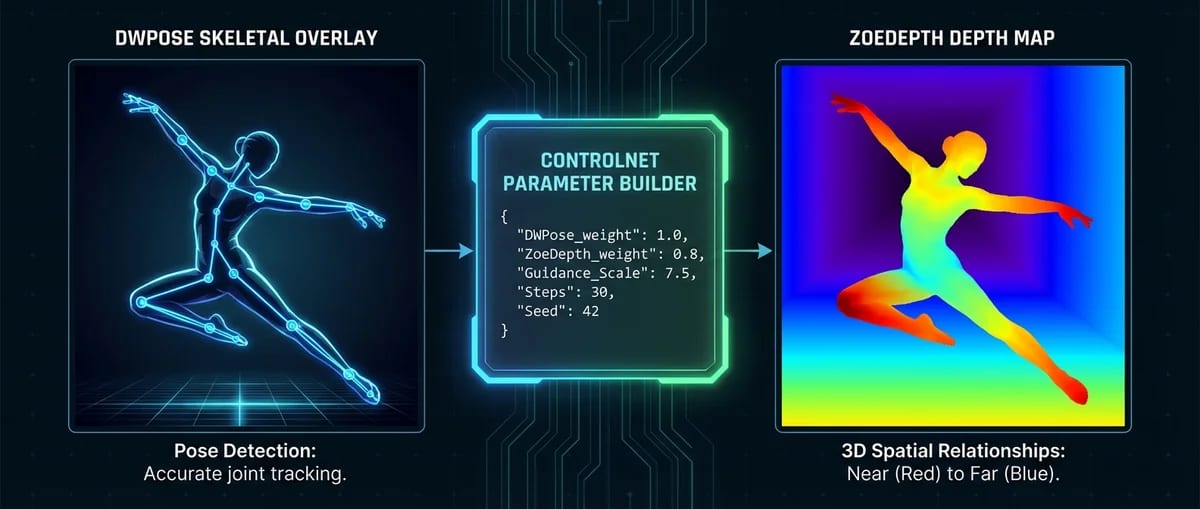
Free Nano Banana ControlNet Parameter Builder
Configure DWPose pose control and ZoeDepth depth maps with visual sliders. Generate structured JSON prompts for Nano Banana Pro instantly.
ControlNet Configuration
Configure DWPose pose control and ZoeDepth depth maps for precise AI image generation.
DWPose Pose Control
Exact skeletal and pose lock
ZoeDepth Depth Control
Depth, volume, and camera-to-body spatial lock
JSON Preview
Generates image with your configured parameters
Understanding Nano Banana ControlNet
ControlNet is an advanced AI image control system that gives you precise control over pose, depth, and spatial relationships in your AI-generated images. Unlike standard text-to-image generation where results can be unpredictable, ControlNet lets you lock exact poses (DWPose) and spatial relationships (ZoeDepth) for reproducible, professional results.
Only Nano Banana Pro offers this level of control - Midjourney and DALL-E do not support ControlNet. While Stable Diffusion has ControlNet, it requires technical knowledge, local installation, and manual JSON coding. Nano Banana Pro eliminates technical barriers with a visual interface, real-time JSON preview, and educational tooltips.
DWPose locks exact skeletal and pose structures, ensuring your subject maintains the same posture across multiple generations with Nano Banana ControlNet. ZoeDepth preserves spatial relationships and volume, preventing the AI from "flattening" your subject. Together, they provide professional-grade ControlNet parameters previously only available to technical users.
DWPose in Nano Banana ControlNet
AI Pose Control with DWPose
DWPose is a pose detection model that extracts skeletal structure from reference images. It identifies joint positions, limb angles, body posture, and facial orientation, then uses this data to lock the exact pose in Nano Banana ControlNet generations.
How it works:
- Upload reference image (optional but recommended)
- DWPose analyzes pose and skeletal structure
- Nano Banana ControlNet locks exact pose in generation
- Subject maintains posture across multiple generations
Use cases:
- Character reference sheets with ControlNet parameters (consistent character across multiple poses)
- Product photography with ControlNet (same product, different backgrounds)
- Fashion photography with ControlNet (same outfit, different poses)
- Sports and action shots with Nano Banana ControlNet (dynamic pose locked)
When to use weight values:
- 1.0: Exact pose lock (no deviation) - Use for character sheets, product catalogs
- 0.7-0.9: Strong pose control (minor adjustments allowed) - Use for fashion, portraits
- 0.5-0.7: Moderate pose influence (flexible interpretation) - Use for artistic exploration
- Below 0.5: Weak pose control (not recommended for consistency)
ZoeDepth in Nano Banana ControlNet
ZoeDepth is a depth estimation model that creates 3D spatial understanding from 2D images. It analyzes volume, distance from camera, and spatial relationships between objects, then uses this data to preserve realistic depth in Nano Banana ControlNet generations.
How it works:
- Upload reference image (optional but recommended)
- ZoeDepth analyzes depth and volume
- Nano Banana ControlNet locks spatial relationships in generation
- Subject maintains volume and separation from background
Use cases:
- Product photography with ControlNet (preserve product volume and shape)
- Portrait photography with ControlNet (maintain body proportions, prevent flattening)
- Architectural visualization with ControlNet (preserve spatial depth)
- Plus-size representation with ControlNet (prevent AI slimming effect)
When to use weight values:
- 0.8-1.0: Strong depth lock (recommended for product/portrait) - Use for professional accuracy
- 0.5-0.7: Moderate depth control (some artistic freedom) - Use for creative projects
- Below 0.5: Weak depth influence (not recommended for accuracy)
ControlNet Tutorial for Nano Banana
How to Use This Tool
Step 1: Configure ControlNet Parameters
Describe your subject in the Subject Configuration panel. Include description, attire, physical features (body type, hair, skin), and accessories. Example: "Young woman with tanned skin and blonde balayage hair wearing a red bodycon dress."
Step 2: Set Up Pose Control
Choose pose type from dropdown or describe custom pose in Pose Configuration panel. Add pose constraints to DWPose section (e.g., "preserve back arch", "maintain posture"). Set recommended weight to 1.0 for exact pose lock with Nano Banana ControlNet.
Step 3: Configure Depth Control
Add depth constraints to ZoeDepth section (e.g., "preserve volume", "maintain separation"). Set recommended weight to 0.8 for strong depth lock with Nano Banana ControlNet. This prevents the AI from flattening your subject.
Step 4: Build Negative Prompt
Toggle forbidden elements you want to prevent. Common additions: "beautification filters", "skin smoothing", "stylized realism" (to preserve authenticity). Add custom forbidden elements if needed.
Step 5: Generate JSON
Copy JSON from the preview panel on the right, OR click "Test with Nano Banana Pro" to generate immediately. The JSON is formatted for direct use with Nano Banana ControlNet parameters.
Step 6: Use with Nano Banana Pro
Paste JSON into Nano Banana Pro prompt field. Upload reference image (optional but recommended for best results). Generate with exact control over pose and depth.
ControlNet Parameters Best Practices and Tips
1. Start with Presets
Use built-in presets (Character Sheet, Product Photo, Fashion Editorial) as starting points. Adjust ControlNet parameters incrementally to learn how each affects results.
2. Weight Values Explained
DWPose 1.0 = exact pose lock (use for consistency with Nano Banana ControlNet). ZoeDepth 0.8 = strong depth lock (prevents flattening). Lower values = more creative freedom (less control).
3. Constraint Arrays
Be specific: "preserve back arch" is better than "preserve pose". Include 3-5 constraints per ControlNet model. Test variations to see what works best.
4. Negative Prompt Strategy
Use 19 preset categories as a checklist for ControlNet parameters. Add custom forbidden elements based on your needs. Common additions: "skin smoothing", "stylized realism".
5. Reference Images
Always upload reference when using ControlNet. Reference provides DWPose/ZoeDepth input data. Without reference, ControlNet has no pose/depth to "lock" with Nano Banana Pro.
6. Save Your Configurations
Use "Save as Preset" to store successful ControlNet parameter setups. Name presets descriptively (e.g., "Product Photo - Front View"). Share presets with team for consistency.
Nano Banana ControlNet FAQ
Frequently Asked Questions
What is ControlNet and why should I use it?
ControlNet is an advanced AI image control system that gives you precise control over pose, depth, and spatial relationships in your AI-generated images. Unlike standard text-to-image generation where results can be unpredictable, ControlNet lets you lock exact poses (DWPose) and spatial relationships (ZoeDepth) for reproducible, professional results. Only Nano Banana Pro offers this level of control - Midjourney and DALL-E do not support ControlNet.
What's the difference between DWPose and ZoeDepth?
DWPose is a pose control model that extracts skeletal structure from reference images and locks exact body positions, limb angles, and posture. Use DWPose when you need consistent poses across multiple generations (character reference sheets, product photography). ZoeDepth is a depth estimation model that creates 3D spatial understanding and locks volume, depth, and camera-to-body distance. Use ZoeDepth to prevent the 'flattening' effect and maintain realistic spatial relationships. You can use both together for maximum control.
How do ControlNet parameter weights affect results?
Weight values (0.0-1.0) control how strongly ControlNet influences the generation. Higher values = stricter adherence to your reference. For DWPose, use 1.0 for exact pose lock (no deviation), 0.7-0.9 for strong control with minor adjustments, 0.5-0.7 for moderate flexibility. For ZoeDepth, use 0.8-1.0 for strong depth lock (recommended for product/portrait), 0.5-0.7 for some artistic freedom. Values below 0.5 provide weak control and are not recommended for consistency.
Do I need a reference image for ControlNet to work?
For text-to-image generation without a reference, ControlNet parameters provide structured guidance but work best when combined with a reference image. When you upload a reference image, DWPose and ZoeDepth analyze the pose and depth from that image, then lock those characteristics in the generation. Without a reference, ControlNet uses your parameter constraints as guidance, but results may be less precise. For professional-grade consistency, always upload a reference image when using ControlNet.
Can I use ControlNet for text-to-image (no reference)?
Yes, you can use ControlNet parameters for text-to-image generation without uploading a reference image. The structured JSON prompt provides detailed guidance on pose, depth, constraints, and negative prompts. However, for the most precise control, we recommend uploading a reference image so DWPose and ZoeDepth can analyze exact pose and depth characteristics. The parameter builder tool works for both scenarios with or without reference.
How many credits does ControlNet generation cost?
ControlNet generation with Nano Banana Pro costs 20 credits per generation. This is the same rate as all Nano Banana Pro advanced features. Credit pricing starts at $4.99 for 550 credits, with bulk discounts up to 3000 credits for $19.99. Each generation includes both pose control (DWPose) and depth control (ZoeDepth) when configured in your parameters.
What's the recommended weight for DWPose vs ZoeDepth?
For DWPose pose control, we recommend 1.0 for exact pose lock when consistency is critical (character sheets, product catalogs). Use 0.8-0.9 for strong control with minor adjustments. For ZoeDepth depth control, we recommend 0.8 for most use cases (portraits, products, architecture) - this provides strong depth lock while maintaining natural appearance. Use 0.9-1.0 when exact spatial relationships are essential. Lower values (0.5-0.7) provide more creative freedom but less control.
How do I prevent AI from 'beautifying' or slimming my subject?
Use the Negative Prompt Builder to toggle forbidden elements that cause AI beautification. Key presets include: 'beautification filters', 'skin smoothing', 'plastic skin', 'airbrushed texture', 'body proportion averaging', 'reduced curves', 'slimmed torso', 'flattened glutes', and 'aesthetic proportion correction'. These 19 preset categories prevent AI from applying beauty standards and preserve authentic body characteristics. You can also add custom forbidden elements for specific needs.
Can I save and load my ControlNet configurations?
Yes, the parameter builder tool includes preset management. Click 'Save as Preset' to store your configuration locally with a custom name. Use 'Load Preset' to recall saved configurations. We also include built-in presets for common scenarios (Character Sheet, Product Photo, Fashion Editorial) to help you get started. Saved presets are stored in your browser's localStorage and persist between sessions.
Is Nano Banana ControlNet better than Midjourney or DALL-E?
Nano Banana Pro is the only web-based AI image tool that offers ControlNet integration with DWPose and ZoeDepth. Midjourney and DALL-E do not support ControlNet - they cannot lock exact poses or depth, leading to inconsistent results. Stable Diffusion has ControlNet but requires technical knowledge, local installation, and manual JSON coding. Nano Banana Pro eliminates technical barriers with a visual interface, real-time JSON preview, and educational tooltips, making professional-grade control accessible to everyone.
💰 Choose Your Plan
Select the perfect package for your creative needs
55 images package
- GPT-Image-1: 55 images (10₵/image)
- Nano Banana: 27 images (20₵/image)
- Nano Banana Pro: 11@1K / 9@2K / 6@4K (50-80₵/image)
- 550 credits total
- 6+ artistic styles
- Up to 4K resolution (4096×4096)
- Commercial usage rights
120 images package
- GPT-Image-1: 120 images (10₵/image)
- Nano Banana: 60 images (20₵/image)
- Nano Banana Pro: 24@1K / 20@2K / 15@4K (50-80₵/image)
- 1200 credits total
- 6+ artistic styles
- Up to 4K resolution (4096×4096)
- Commercial usage rights
300 images package
- GPT-Image-1: 300 images (10₵/image)
- Nano Banana: 150 images (20₵/image)
- Nano Banana Pro: 60@1K / 50@2K / 37@4K (50-80₵/image)
- 3000 credits total
- 6+ artistic styles
- Up to 4K resolution (4096×4096)
- Commercial usage rights
Ready to Build Advanced AI Prompts?
Configure DWPose pose control and ZoeDepth depth maps with visual sliders. Generate structured JSON prompts for Nano Banana Pro with professional precision.
20 credits per generation
🔗 Related AI Tools
Explore more creative AI-powered image generators and style transformation tools
Contact Us
Have questions or suggestions? Feel free to get in touch