Attention: Sign up to get 100 credits for free!
AI Lighting Diagram Generator
Reverse-engineer any film scene's lighting setup in seconds. Upload a movie screenshot and get a professional lighting diagram with labeled equipment, light positions, and camera settings.
50-80 credits | 30-60 seconds
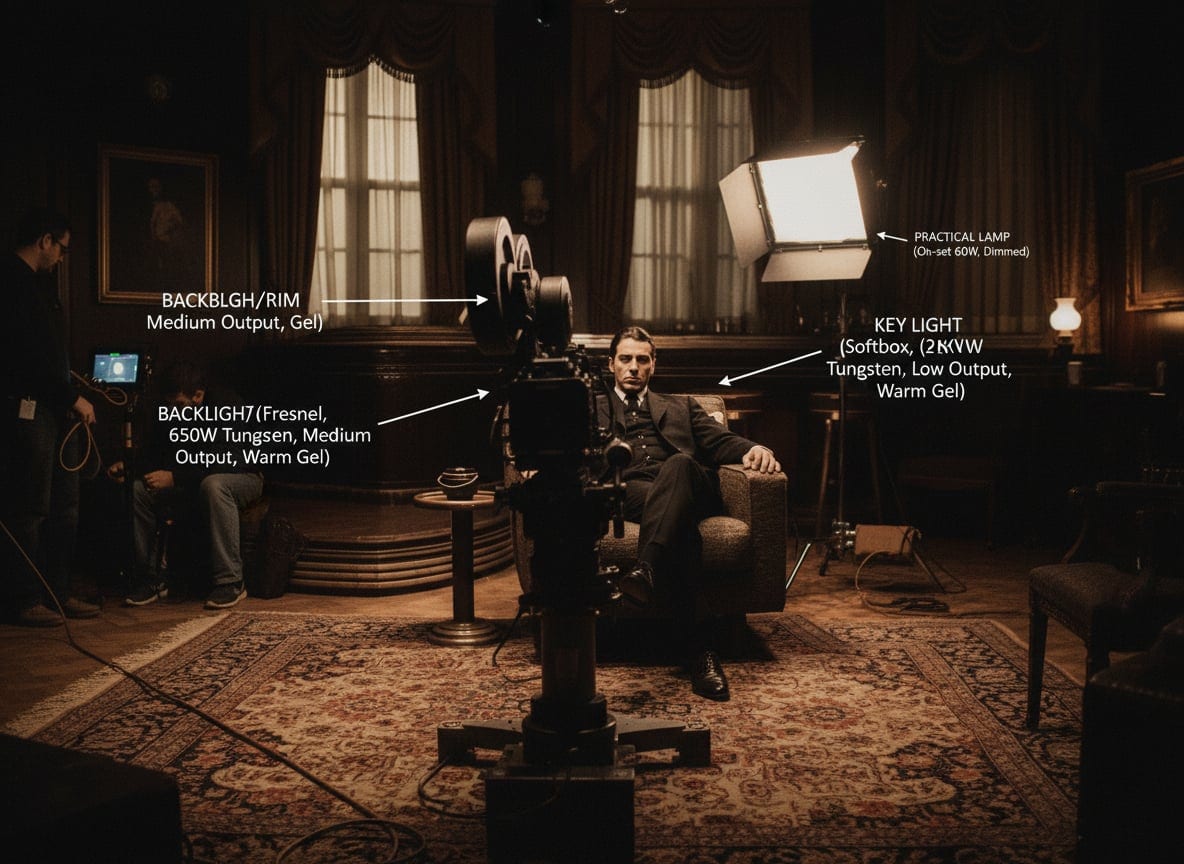

Free Lighting Diagram Generator for Film Scenes
Upload any film screenshot to analyze its lighting setup. Our AI generates professional BTS lighting diagrams with labeled equipment and positions.
Our AI lighting diagram generator transforms the way you learn cinematography. Unlike traditional film education that takes years, this lighting diagram tool lets you instantly reverse-engineer any film scene's lighting setup. Upload a frame from your favorite movie, and our AI identifies the key light, fill light, rim lights, practicals, and all equipment positions. Perfect for film students studying lighting techniques and film lighting fundamentals, YouTubers wanting to replicate cinematic looks, and production houses needing quick pre-visualization.
How the Lighting Diagram Generator Works
From film frame to professional BTS diagram in three simple steps
Upload Film Screenshot
Capture any frame from a movie, TV show, or video content you want to analyze
AI Identifies Equipment
Our AI analyzes the scene to identify lighting positions, equipment types, and camera angles
Download Lighting Diagram
Get a professional lighting diagram with labeled equipment, positions, and technical settings
Film Lighting Analysis - Lighting Diagram Key Concepts
Understanding cinematography lighting fundamentals helps you decode any film scene and recreate professional looks. A lighting diagram breaks down each light source in a scene, making it easy to study how professional cinematographers setup their lighting.
Three-point lighting is the foundation of cinematography lighting. It consists of three main light sources: the key light (primary illumination), fill light (shadow softening), and backlight (subject separation). Understanding this setup is essential for analyzing any film scene.
Key Terms
Professional cinematographers use advanced techniques like Rembrandt lighting, butterfly lighting, and split lighting to create specific moods. Each technique manipulates light direction, intensity, and color temperature to achieve dramatic or naturalistic effects.
Key Terms
Professional film sets use specific equipment like Fresnel lights, HMI lamps, LED panels, and diffusion materials. Understanding equipment names and their positioning (front, side, back, overhead) helps decode any lighting diagram. A lighting setup diagram shows exactly where each piece of equipment is placed relative to the camera and subject.
Key Terms
Camera angle and lens choice directly affect how lighting appears on screen. A side-lit scene looks completely different when shot from the front versus the side. Understanding this relationship helps recreate any film look in your own productions.
Key Terms
Our AI lighting diagram generator analyzes these cinematography lighting patterns automatically, identifying three point lighting setups, fill light positions, and equipment placement from any film screenshot.
AI Lighting Diagram Analysis vs Manual Creation
See how AI-powered lighting diagram analysis compares to traditional methods for creating lighting setup diagrams
| Feature | AI Lighting Analyzer | Manual Creation | Text-Based Advice |
|---|---|---|---|
| Speed | 30-60 seconds | Hours | Minutes of reading |
| Accuracy | Trained on films | Depends on user skill | Generic advice |
| Learning | Visual + Labeled | Hands-on practice | Theoretical only |
| Output | Labeled diagram + data | Basic sketches | No visuals |
| Equipment Knowledge | Auto-identified | Must know beforehand | General terms |
| Scene Analysis | Any film frame | From memory/notes | Limited examples |
Speed
Accuracy
Learning
Output
Equipment Knowledge
Scene Analysis
Real-World Use Cases
Professionals and learners use our lighting diagram generator for education, production, and creative workflows. For product and mechanical documentation, explore our Exploded View Generator to create CAD-style technical diagrams. Want to analyze visual composition instead? Try our Attention Heatmap Generator to see where viewers focus on your images.
Film Students
Learn lighting techniques by analyzing scenes from classic and contemporary films. Use lighting diagrams to understand how master cinematographers create mood and atmosphere.
- Study three point lighting setups
- Analyze Hollywood blockbuster film lighting techniques
- Compare cinematography lighting styles across genres
YouTubers & Content Creators
Replicate cinematic looks from your favorite films without expensive equipment rentals or professional training. Our lighting diagram generator accelerates learning.
- Match movie lighting on a budget
- Create professional-looking content
- Learn from top cinematographers
Ad Agencies & Production Houses
Speed up pre-visualization and client presentations with instant lighting setup diagrams and lighting references.
- Quick reference for pitch decks
- Pre-production planning with lighting diagrams
- Client communication tool
Independent Filmmakers
Design lighting plans without hiring a DP for the planning phase. Get professional lighting diagram references instantly.
- Budget-friendly pre-production
- Self-directed lighting plans
- Quick film lighting breakdowns
Before & After Lighting Diagram Gallery
See the transformation from film frames to professional lighting diagrams. Each lighting diagram shows how our AI breaks down the lighting setup. Click any image to enlarge.
Each lighting diagram shows key light, fill light, and backlight positions extracted from the original film frame using AI analysis.
Flexible Credit Packages
Choose the package that fits your production workflow
55 images package
- GPT-Image-1: 55 images (10₵/image)
- Nano Banana: 27 images (20₵/image)
- Nano Banana Pro: 11@1K / 9@2K / 6@4K (50-80₵/image)
- 550 credits total
- 6+ artistic styles
- Up to 4K resolution (4096×4096)
- Commercial usage rights
120 images package
- GPT-Image-1: 120 images (10₵/image)
- Nano Banana: 60 images (20₵/image)
- Nano Banana Pro: 24@1K / 20@2K / 15@4K (50-80₵/image)
- 1200 credits total
- 6+ artistic styles
- Up to 4K resolution (4096×4096)
- Commercial usage rights
300 images package
- GPT-Image-1: 300 images (10₵/image)
- Nano Banana: 150 images (20₵/image)
- Nano Banana Pro: 60@1K / 50@2K / 37@4K (50-80₵/image)
- 3000 credits total
- 6+ artistic styles
- Up to 4K resolution (4096×4096)
- Commercial usage rights
Frequently Asked Questions
Everything you need to know about lighting diagram generation
What film scenes can I analyze?
You can analyze any film scene from movies, TV shows, commercials, or even your own footage. Simply upload a screenshot or frame from the video. The AI works best with well-lit scenes where lighting setups are visible in the final composition. Dramatic lighting setups, three point lighting, and complex multi-light scenes all work excellently with our lighting diagram generator.
How accurate is the lighting breakdown?
Our AI has been trained on extensive cinematography resources and can identify common lighting patterns, equipment types, and positioning with high accuracy. It recognizes key lights, fill lights, rim lights, practicals, and specialized equipment like HMIs, LEDs, and softboxes. While the AI provides professional-level analysis, we recommend using it as a learning tool and reference rather than exact technical specifications.
Can I export the diagram for production use?
Yes, all generated lighting diagrams can be downloaded as high-resolution images suitable for production planning, storyboarding, and educational purposes. Each lighting diagram includes labeled equipment positions, light types, and technical notes that you can use directly in your pre-production workflow and pre-visualization.
What resolution should I choose?
Choose 1080P (50 credits) for quick reference and learning. Select 2K (60 credits) for detailed analysis and print-quality exports. Use 4K (80 credits) for professional production planning where maximum detail and clarity are essential. Higher resolutions provide more detailed equipment labels and cleaner diagram lines.
Can I use this for commercial projects?
Absolutely. The lighting diagrams you generate are yours to use for commercial production planning, client presentations, educational content, and professional workflows. Many ad agencies and production houses use our tool for quick pre-visualization. Please refer to our Terms of Service for full commercial usage rights.
How long does generation take?
Lighting diagram generation typically takes 30-60 seconds depending on scene complexity and selected resolution. The AI analyzes the frame, identifies film lighting patterns, maps equipment positions, and generates a professional BTS lighting diagram with labeled annotations. Higher resolutions may take slightly longer due to increased detail processing.
What output formats are supported?
Generated diagrams are delivered as high-resolution PNG images with transparent-friendly backgrounds. The output includes the original scene reference, a top-down or isometric view of the lighting setup, and labeled equipment with technical specifications. All formats are optimized for digital sharing and print use.
Can I analyze TV shows or other videos?
Yes, the tool works with any visual content including TV shows, music videos, commercials, YouTube videos, and even video game cinematics. Simply capture a frame or screenshot from the content you want to analyze. The AI treats all visual content equally and can create professional lighting diagrams that break down the lighting setup regardless of the source medium.
🔗 Related AI Tools
Explore more creative AI-powered image generators and style transformation tools
Nano Banana Pro
NEW!Studio-quality AI image generator powered by Google Gemini 3 Pro with 2K/4K resolution support
Anime Hybrid Portrait Generator
NEW!Blend realistic photos with Japanese anime elements - companions, magical objects, energy effects
Chibi Plush Generator
PopularTransform photos into adorable chibi plush toy style with soft textures
Character Figurine Generator
PopularCreate detailed character figurines with professional 3D modeling aesthetic
Pop Art Vector Portrait
NEW!Transform photos into vectorized flat-color pop art with Andy Warhol aesthetics
Bottle Diorama Generator
PopularTransform into a tiny figure trapped in hyper-realistic glass bottle worlds
Ready to Analyze Your First Scene?
Join thousands of filmmakers, students, and content creators who are learning cinematography through AI-powered lighting diagram scene analysis.
No film school required. Just upload and learn.
Contact Us
Have questions or suggestions? Feel free to get in touch